
Free download, no email required
Free rent ledger template for landlords
A rent ledger that settles "I already paid you" arguments. Pick a tenant and the balance, dashboard and a printable statement fill in for you. Corrections never erase history, and deposits stay separate. Works in Excel and Google Sheets.
The main download comes filled with sample tenants so you can see how it works. The blank version is ready for your own.
What's inside
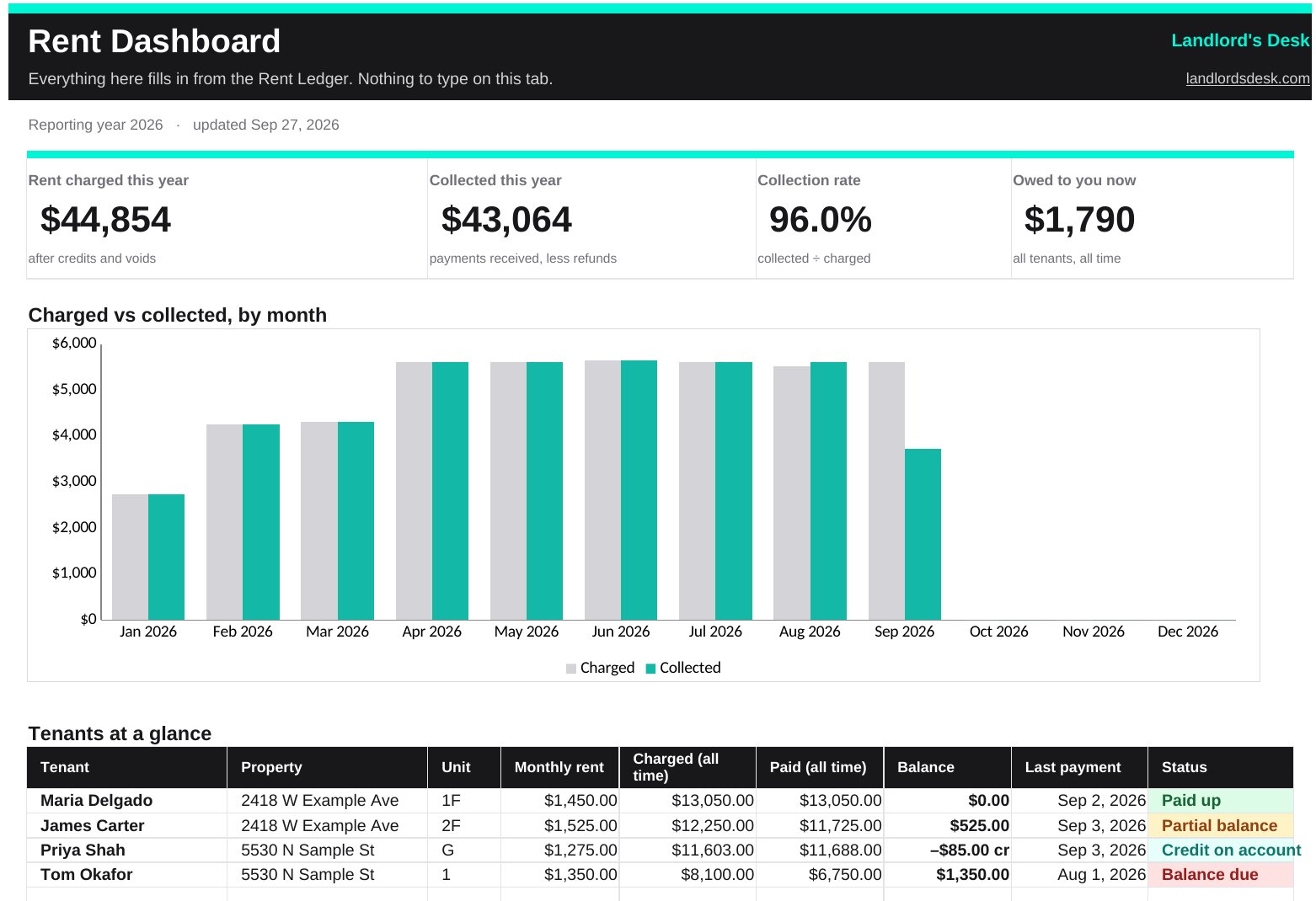
- Dashboard: rent charged, collected, collection rate and what you're owed right now, a month-by-month chart, and every tenant's balance with a Paid up, Partial balance or Balance due status.
- Rent Ledger: dropdowns for tenant, entry type and payment method. Property, unit and a running balance per tenant fill in automatically.
- Tenant Statement: pick a tenant and print or save a clean statement of their account, with lease details and current balance.
- Monthly Summary: charged vs collected for each month of the year.
- Security Deposits: money in, deductions and returns, with the amount held for each tenant.
- Setup and Start here: add each tenant once, plus the five rules below and a guide to where every amount goes.
The five rules of a rent ledger that settles arguments
- One line per charge and one line per payment. Never overwrite a cell. The moment you edit a number in place, you lose the story of how you got there.
- Charge first, then record payments against it. The balance is always total charges minus total payments. Skip the "paid / unpaid" checkboxes.
- Fix mistakes with a new line. Record an adjustment or void instead of deleting, so the history always adds up and anyone can follow it.
- Write down the method and reference. Zelle confirmation number, check number, cash receipt number. That's what ends disputes.
- Keep security deposits separate. Mixing deposit money into the rent ledger is how small disagreements turn into small-claims court.
How to use it with Google Sheets
Open Google Sheets, choose File, then Import, and upload the file. Everything works the same, including the dropdowns and dashboard. In Excel, use Excel 2019 or later, or Excel for Microsoft 365.
Rent is late? The free late rent notice kit has a friendly reminder, a past-due notice with an itemized balance and a payment plan agreement. Raising the rent? Use the free rent increase letter kit. Tenant moving out? The free security deposit return kit itemizes deductions against the deposit.
Want the ledger to run itself?
Landlord's Desk posts rent automatically, records online payments the moment they clear, keeps every correction on the record, and shows your tenant the same balance you see. Founding members get up to 60 days free, then 30% off their first year.
This template is provided as-is for recordkeeping. It is not legal, tax or accounting advice, and deposit and late-fee rules vary by state and city.